
Built Inside a Working Agency
TraceForge was built in a collection office with Point Callers, Closers and skip tracers using it every day. The screens follow how a collection floor actually runs.

Work accounts, skip trace, take payments, hand out placements and call debtors with local caller ID, all in your browser. No installs, no per-PC licenses, no separate phone company. Built inside a working collection agency.
Most agencies run on desktop software, a phone company, a merchant site and a stack of spreadsheets. TraceForge puts the whole floor in one place, so your people spend the day collecting instead of copying.
Per-PC licenses, and a license lost when a computer dies
One monthly price per person. Sign in from any computer, any office, or home.
A separate phone company, PBX and softphones to keep running
Calling, local caller ID, toll-free lines, voicemail, listen-in and 911 inside the same screen and on the same bill.
Card numbers copied into a merchant site by hand every morning
Payments charge through your own gateway on their date by themselves. Declines go straight back to Call Backs.
Guessing who actually worked their hours
A real time clock with breaks, an idle check that catches walk-aways, and a time sheet built for payroll.
Duplicate placements found after you've called them
Every file checked against every account before it loads, with the list waiting for you in Notifications.
Reports someone builds in Excel on Friday
The full report list, remittance with your commission worked out, and a portal where clients pull their own reports.
TraceForge was built in a collection office with Point Callers, Closers and skip tracers using it every day. The screens follow how a collection floor actually runs.
Calling hours locked by the debtor's time zone, area codes checked against the address, blocked area codes, age cutoffs, the monitoring notice and a log of every action on every account.
Point Callers, Head Point Callers, Closers, Admins, remote callers and importers each get exactly the screen they need, and nothing they shouldn't see.
Nothing to install and no server to buy. Load a file, add your people and start calling, with your data stored and backed up every night for you.
One account, everything on it: debtor, phones, addresses, notes, status and balance, with the debtor's local time and whether it's OK to call.
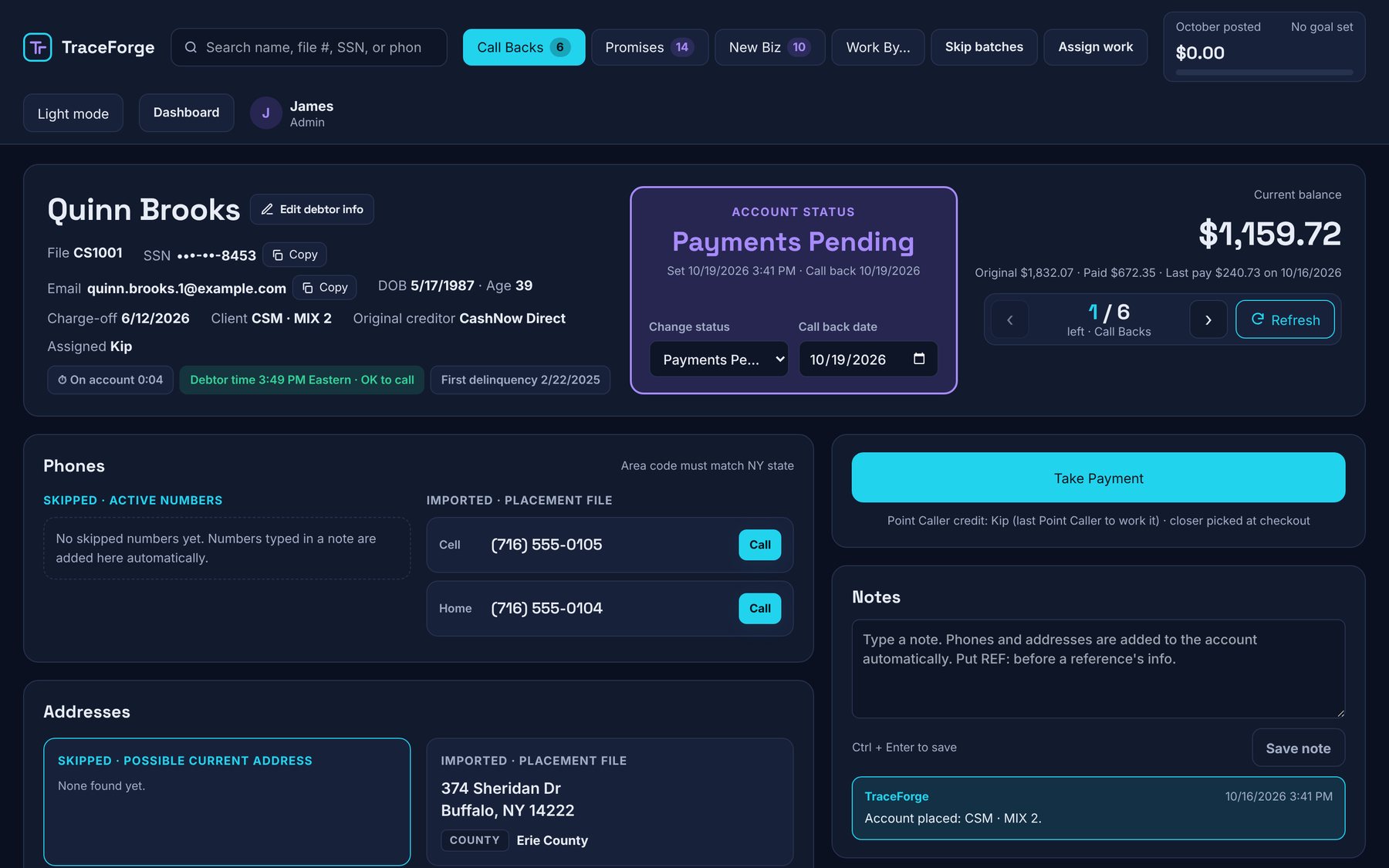
Everything your office does in a day, from the first call to the remittance check.
Call Backs, New Biz and All My Accounts, each showing only what's assigned to you. Promises come back on their Promise By date. Every account stays open around the clock for overnight skip tracing; only the phone is locked outside the debtor's local hours.
Paste results from your skip-trace provider into a note. TraceForge files the phones and addresses on the account and marks it skipped.
One-time payments and weekly, bi-weekly, monthly or custom plans, charged through your own merchant account, plus pay links debtors use to pay online.
Drop in a client's Excel or CSV file. Columns are matched and remembered per client, every file is checked for duplicates automatically and the list lands in Notifications. Export a package to rotate or sell it, with dead and bankrupt accounts left out or clearly marked.
See how much unworked New Biz is left in every package, hand accounts out by person, package or status, and split a whole placement evenly between people.
The full report list you know from CollectionsMax, with Excel and PDF, plus a portal where your clients log in to see their own accounts, remittance and reports.
Clock In, Break and Clock Out on every work screen. A “Still Working?” check catches anyone who walks away, late work is logged as After Hours, and every time fix is recorded with who made it and why.
Every agency gets its own database and login, encrypted backups every night, and Social Security numbers stored encrypted.
Their own queues: skip, call, note. Credit when their accounts pay. A Head Point Caller also gets the Team board, with every caller's week and month posted and pending, a Promise to Pay watch list, listen-in and the regional voicemail.
Everything a Point Caller does, plus payments, plans, assigning work and reports.
The whole agency: overview, imports, users, statuses, hours and every report.
A plain calling screen in time-zone order: name, phones, address and account number, only during calling hours. No SSNs, balances or search, locked down on the server.
Only Import/Export. Someone can load and export your debt files without ever seeing payments, people or settings.
Call from the account with local caller ID, ring your closers on their toll-free numbers, work every callback from one voicemail inbox, and keep your numbers off the spam lists. It's all inside TraceForge, on one bill, set up from one screen.
Click a number and it dials in the browser with a headset. No desk phones, no softphone to set up, no PBX.
Each call shows a number from the debtor's area code or state. An area-code planner reads your own accounts and tells you which numbers to buy.
Each closer's toll-free number rings them (or their group), in and out. Callers hear your recorded greeting if nobody picks up. Only Closers and Admins can transfer calls.
Check off numbers in bulk, group your regional numbers, and point any set of numbers at any set of people. The Phone Board shows every office phone and who it rings.
Anyone can call anyone else in the office straight from the phone bar. No extensions to remember.
Your Head Point Caller can quietly listen in on a Point Caller's live call from the Team board. The caller and debtor never hear a thing.
Regional callbacks go to one voicemail box anyone can work, with one-click call back. The person you pick for each number gets a pop-up when one comes in. Add transcription for $10/month per number and read them instead of listening.
Every number is checked for “Scam Likely” labels. Flagged numbers come off caller ID and can be replaced automatically.
Calls are locked outside each debtor's local calling hours, and every call is logged on the account with its result.
Move your existing numbers from your old phone company right from TraceForge: fill it in, sign on screen, and track it to the switch.
Record greetings in the browser for one number or all of them, and play hold music while callers wait: ours or your own.
Each office's address is registered for 911, admins are told when it's used, and a dispatcher's callback rings the person who called.
Move over at your own pace. Your old system isn't touched, so you can run both side by side while your team gets comfortable.
TraceForge connects to your CollectionsMax database and brings over accounts, phones, addresses, notes and payment history. Postdated payments set up there can stay there.
Export your accounts from any collections program and load them on Import/Export, the same screen you'll use for new placements, with the duplicate check built in.
Move your toll-free numbers over from your old phone company and pick up fresh local numbers in TraceForge. Calls keep working on your old service until the switch.
Every feature for every agency, with your data stored and backed up for you. Add people at $39 each, and add the phone system when you want it. Try it free for 14 days, no card needed.
Includes 3 users. Additional users $39/month each. One-time $149 setup, charged with your first month.
With 2,500 minutes per person, shared across your agency. Numbers $2.00 regional and $5 toll-free per month, spam-flag monitoring $150/month plus $0.25 per number checked once a month, $0.50 per number checked every 2 weeks, $1 per number checked once a week, $4 per number checked every weekday, 911 $3 per office. Optional voicemail transcription $10/month per number. One-time phone setup $299, charged when the phone is turned on. The phone isn’t part of the free trial; it opens once you subscribe.
Includes 20,000 calling minutes a month, shared (about 2 hours of talk per person per day); beyond that 1.5¢ a minute. One-time $149 setup with your first payment, plus a one-time $299 phone setup when the phone is turned on.
No. TraceForge runs in the web browser on any PC, with nothing to install and no per-computer licenses. If a computer dies, sign in on another one and keep working. The built-in phone runs in the browser too; all you need is a headset.
$199 a month covers your agency with 3 users, and each additional user is $39 a month. There's a one-time $149 setup fee, charged with your first monthly payment. The phone system is optional: $25 per person with 2,500 minutes each, plus your numbers and a one-time $299 phone setup. It isn't part of the free trial; it opens once you subscribe. Use the estimator above for your office.
Yes. 14 days, no card needed. Your trial starts with fictional demo accounts so you can try everything right away; clear them out with one click when you load your own. If you don't subscribe, nothing is charged.
Yes. TraceForge connects to your CollectionsMax database and brings over accounts, phones, addresses, notes and payment history. Nothing in CollectionsMax is changed, so you can move over at your own pace.
Export your accounts to Excel or CSV and load them on Import/Export; that works with anything. If your system runs on MySQL, SQL Server, PostgreSQL or IBM i (AS400), we can also set up a direct import. Email help@traceforge.solutions.
No. Click-to-call also works with the MicroSIP softphone, so any phone system MicroSIP can sign in to works with TraceForge. The built-in phone is there when you want one less bill and one less vendor.
Yes. Most agencies move their toll-free numbers (the ones debtors know) and get fresh regional numbers in TraceForge. You request the move inside TraceForge, sign on screen, and keep your old service until the numbers arrive.
TraceForge checks your numbers for “Scam Likely” and similar labels. A flagged number stops being used as caller ID but keeps taking callbacks, and it can be replaced with a new number in the same area code automatically.
Closers take one-time payments and payment plans right on the account, and the right closer and Point Caller get credit. Connect your own NMI gateway and TraceForge charges cards and bank accounts (ACH) itself: today's payment runs on the spot and postdated ones run on their date, with declines sent straight to Call Backs. Card and bank numbers go to NMI's vault and are never stored in TraceForge. Closers can also email a debtor a secure pay link; the debtor confirms their identity and pays online, and it posts to the account on its own. Each payment TraceForge runs adds $0.50 to your monthly bill.
Point Callers and Closers click Clock In before they start; their accounts and phone stay locked until they do. Breaks are their own button. If someone leaves the screen up and walks away, a “Still Working?” box gives them two minutes, then clocks them out at their last real activity, so idle time isn't paid. Nobody is cut off at closing time: work after it is logged as After Hours for your records.
Yes. Pick the packages and TraceForge builds an Excel or CSV file with the account info and every address and phone number your team found. Paying and paid accounts are always left out, and deceased and bankrupt accounts can be left out or marked DO NOT WORK. Exported accounts stay in TraceForge view only, in case of a chargeback or dispute.
Point Callers see their own queues and accounts. A Head Point Caller also sees the Team board and Promise to Pay watch, can listen in on Point Callers, and works the regional voicemail. Closers also take payments, assign work, and see payments and reports. Admins see everything, including hours, settings and imports. Remote Callers get a simple calling screen with only the name, phones, address and account number, with no SSNs, balances or search, and it only brings up accounts inside calling hours. Importers only see Import/Export.
Start a free 14-day trial with demo accounts, then bring your own accounts over when you're ready. No card needed.